
A Walk in the Park
A client came to us with an interesting problem a few weeks ago. They are an ArcGIS shop and had a long-running geoprocessing workflow to generate centerlines from conductors running inside trenches.
Input:

Output:

Should be a breeze, no problem for a GIS, right? What was that, 2,000,000 features? Sounds like a walk in the park. As in, you set the GP tool running and go take a long-ish walk in the park, and when you get back, a freshly-squeezed featureclass is awaiting your return and you give thanks to Redlands.
Not So Fast: ArcPy GP-Based Solution
In lieu of a “CreateCenterlines” piece of GP magic, the client had created centerlines by tiling out the data and :
1. Buffering the lines
2. Dissolving the Buffers
3. Densifying/Creating vertices from the polygon edges
4. Creating Thiessen Polygons
5. Clipping the polygons
6. Polygons to Lines
7. SymDiff
8. Spatial Join
9. Select
10. Trim
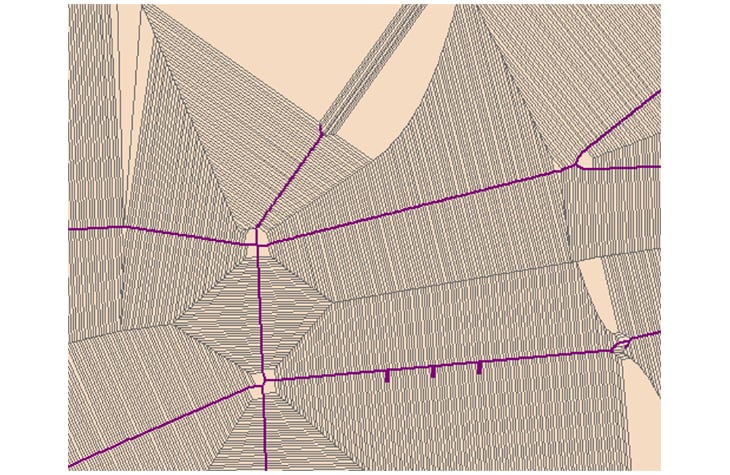
My favorite screenshot of this process exemplifies the main issue of this approach; an explosion of data. Millions of vertices got turned into billions.
99 Problems…in 32 Bits
Turns out that 32 bit processes run out of oomph pretty quickly as they head towards the 1.3GB RAM glass ceiling. Using ArcPY this was a “big data” problem, by which I mean something that had to be (manually) scaled out to handle processing:
• Required 4 machines for 4 days
• Sometimes partially completed, required manually re-running
• ArcPY Error 99999.
• Required manually eyeballing the results to see if any centerlines were missing.
Several Ways to Skin a Cat
Let me say straightaway that I would never skin a cat; the skin adds all the flavor. Poor-tasting feline gags aside, I looked at the following mechanisms:
• ArcGIS Polygon To Centerline Tool
• FME
• PostGIS
Skinning a Cat is Always Messy
In looking at this problem it became apparent that there is no silver bullet; no algorithm will get 100% accuracy. My first instinct was to use an OOTB toolbox tool to get this job done inside the GIS.
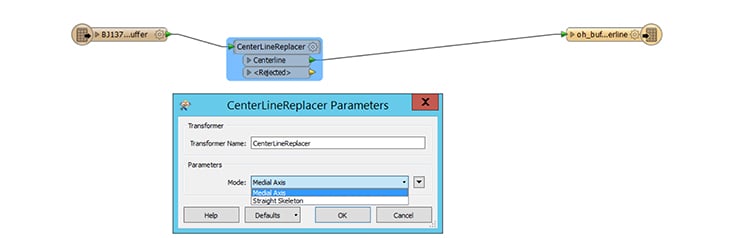
FME is basically yet-another-gp-toolbox, and so I had high hopes for its ability to deliver via its Medial Axis parameter. The first time I ran it, the process ran out of memory. Aha, change the source from ESRI Geodatabase Reader -> File Geodatabase Reader and use the full memory space. This worked — albeit slowly — and I believed that I was done. Then I ran a slightly longer buffer, and a day later I had to wave the white flag as the process was still running at 60GB RAM.
ST_ Functions FTW
Ever since using Oracle Spatial for an integration project, I have pushed for spatial-processing-in-the-database wherever possible. It’s almost always nearly an order of magnitude faster than ArcObjects/ArcPy, with less code & complexity involved. The simplest apples-to-apples comparison for this is ST_Buffer vs arcpy BufferAnalysis on 60k lines. 10 seconds in Postgres vs 75 seconds in ArcPy/Catalog for the same output.
ST Approximate Medial Axis
What I didn’t realize was that, with v2.3 of PostGIS, the SFCGAL functions provide more geospatial pizzaz. Whoever that gal from SFC is, she has written some fine functions including ST_ApproximateMedialAxis. No soup for you, SQL Server / Oracle!
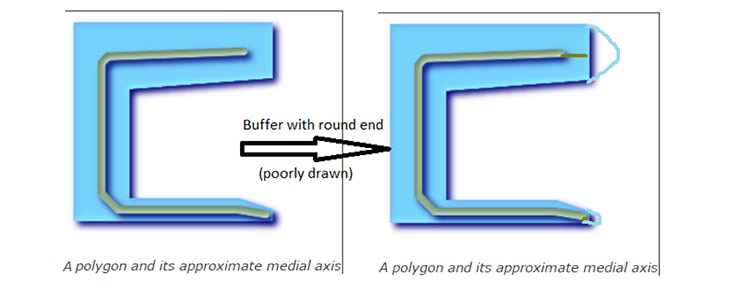
ST_ApproximateMedialAxis did almost everything for me; all I needed to do was create a round buffer end for my polygon to extend the medial axis to each end. [Note, if you’re in an SDE schema in PostGIS you’ll need to use the PG_GEOMETRY default geometry type (aka geometry, not ST_GEOMETRY)].
Dealing with an O(n log n) Algorithm
The ST_ApproximateMedialAxis, whether it’s on FME or PostGIS, does not seem to scale in a linear fashion. One of the nice things about working in SQL vs ArcPy is that it’s easy / quick to be inquisitive about shapes. In this case, st_npoints was useful.
select objectid,st_npoints(geom) from buffer_table order by st_npoints(geom) desc;
This gave me an ordered list of shapes that were likely to be tricky, and a candidate list to check out the time cost of the st_approximatemedialaxis algorithm. So I chose a few complex features to fire the centerline algorithm at.
select st_linemerge(st_approximatemedialaxis(geom)) from buffer_table where objectid=1213;
–100 67ms
# of Points Time (ms)
|
100 |
67 |
|
1000 |
1100 |
|
2000 |
3800 |
|
4000 |
28000 |
Once a feature goes above a few thousand points the algorithm slows to a crawl. A feature over 10,000 points takes over 5 minutes, chews through 100% of a CPU and consumes an ever-increasing amount of memory — there is no memory limit to this query, and it will consume as much as it wants until the host OS chokes. A buffer with 25k points used 30GB RAM but a 50k buffer killed my 64GB RAM laptop in spectacular fashion.
The solution was to tile each large input feature (>20k points) around a fixed grid size. I adapted a version of ST_CreateFishnet to use a fixed-width/height grid size:
CREATE OR REPLACE FUNCTION ST_CreateFishnetByGridSize(
geom geometry, gridsize integer,
OUT “row” integer, OUT col integer,
OUT geom geometry)
RETURNS SETOF record AS
$$
SELECT y + 1 AS row, x + 1 AS col, ST_Translate(cell, x, y) AS geom
FROM
generate_series(floor(st_xmin($1))::int, ceiling(st_xmax($1))::int, $2) as x,
generate_series(floor(st_ymin($1))::int, ceiling(st_ymax($1))::int, $2) as y,
(
SELECT ST_PolygonFromText(‘POLYGON((0 0,0 ‘||$2||’,’||$2||’ ‘||$2||’,’||$2||’ 0,0 0))’) AS cell
) AS foo;
$$ LANGUAGE sql IMMUTABLE STRICT;
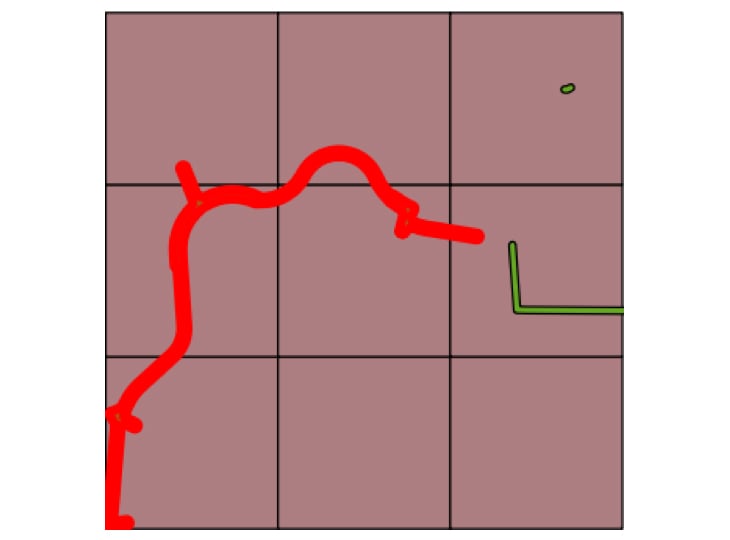
In order to prevent hanging chads at the borders of each tile, the tile was expanded before the medial axis was created and then clipped back to the original tile extent.
Slicing Slivers with the ST_ Swiss Army Knife
After dissolving buffers I was left with “slivers” between my polygons which doubled my centerlines in various places. Postgis gives the ability to deal with this, once you can wrap your head around the generate_series/array functions
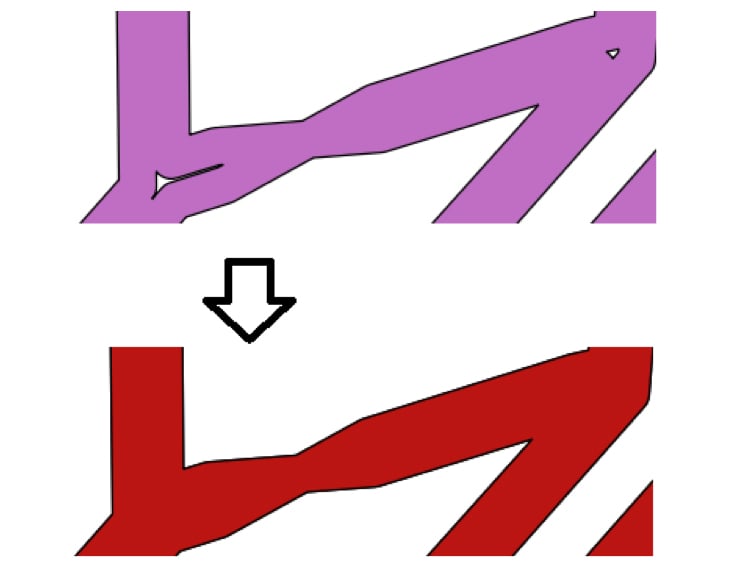
— This will desconstruct/explode the polygon and then reconstruct it without the interior rings in the last where clause below
with ipolys as
(select ST_InteriorRingN(rec_buf.geom, generate_series(1, ST_NumInteriorRings(rec_buf.geom))) as geom,rec_buf.objectid),
opoly as (select st_exteriorring(rec_buf.geom) as geom,rec_buf.objectid,rec_buf.mapno,rec_buf.grid_id)
insert into ug_buffer_expanded(geom, grid_id, mapno) select st_makepolygon(o.geom, ARRAY(select geom from ipolys where
— last where clause to exclude shapes of a certain size and/or shape
st_area(st_makepolygon(geom)) > MAXIMUM_SLIVER_AREA or (st_area(st_makepolygon(geom)) > MINIMUM_AREA and ((st_perimeter(st_makepolygon(geom)) – |/(@((st_perimeter(st_makepolygon(geom)) * st_perimeter(st_makepolygon(geom))) – (16 * st_area(st_makepolygon(geom))))))/4) >= MAXIMUM_SLIVER_WIDTH) and o.objectid=objectid)),o.grid_id,o.mapno from opoly o;
ArcBarf
After creating my first set of centerlines and displaying just fine in QGIS, my heart sank as I attempted to render the table in ArcGIS — only to be greeted by this mystifying error.

Hey, at least it wasn’t a “999999” error — this was a meaningful description with an actionable response. Although ST_Dump -> ST_Collect is still a bit of a headscratcher (meaning I stackoverflowed this, it worked and I walked away), there was a solution. It removes linear segments that are probably smaller than the tolerance (and treated as zero-length).
update tline_oh_centerline set geom = (SELECT ST_Collect(f.the_geom) as singlegeom
FROM (SELECT (ST_Dump(rec_ug.geom)).geom As the_geom from tline_oh_centerline where id = rec_ug.id) as f
where st_length(f.the_geom) > 1) where id = rec_ug.id;
The Law of ‘Nothing is Perfect’
Sad to say but even ST_ApproximateMedialAxis could be foiled now and then, and always with the same sort of error; touching interior rings. So I had a two-fold response. In the exception handler, iteratively remove a single interior ring and try function on the amended geometry until it worked. If that failed then just use the exterior ring, log it and move on. Out of 350k polygons there were only 4 exceptions. Yay!
Our Final Takeaway and Results
Why would anyone use ArcGIS? Well, I still used venerable Arcpy for a number of operations which were either faster or missing in PostGIS. A special shout-out goes to Dissolve in ArcPy, which must have some special sauce to beat ST_Union/ST_MemUnion hands-down. Unsplit and Trim were also key GP tools without (easy/obvious) PostGIS equivalents.
Ultimately PostGIS delivered a solution on a single machine which completes in less than a day. Highlights included:
• The Granularity of ArcObjects
• The Coarseness of ArcPy
• Performance beyond client-based technology’s reach
• Robustness
• ST_ApproximateMedialAxis delivered acceptable data quality for the client
For non-versioned, non-geometric network workflows, PostGIS is a compelling addition to any gisdev’s toolkit. In addition to QGIS, PostGIS works well in a mixed environment with ArcGIS. Having used QGIS as a visualization tool, it seems like it has a ton of GP-style functionality.